

In a single-page application (SPA), users have no idea a new version is available unless they refresh the browser, which they rarely do in a long-lived app with client-side navigation. For three years we’ve run a solution (outlined here) that works well. The server reports its current version, the frontend knows what version it was built with, and a banner shows when they differ.
The Ideal Setting for this Solution
Our use case is internal tools that stay open for a long time. I don’t think this has much value for quick-visit web apps, because you’d naturally pull down the new version when you came back. However, when a tab could stay open on your computer throughout the day, or even throughout the week, being able to trigger refreshes is critical.
What Changed and Why
There have been seven main changes since the last post:
- moved the checking to a public endpoint
- replaced the use of Apollo polling with the native
fetch - reloaded idle tabs without any prompting
- prevented duplicate timers with a singleton on the
windowobject - reloaded on navigation
- capped the backoff
- checked on tab return
Moved check to public endpoint
Prior to this update, the polling went to the main /graphql/ endpoint that was guarded by authentication checks. This caused two problems:
- every version check request would fetch user and session from the database
- polling stopped once a session expired
We moved the version query to our existing public endpoint, /public-graphql/, which skips the session and user lookups.
Replaced Apollo polling with fetch and backoff
All we fetch is a version string. Apollo was more machinery than we needed for this. Switching to fetch gave us more control over the timing of the polls.
We switched from a fixed 15-second poll on every open tab to a backoff that stays at 15 seconds while the user is active, doubles while idle, and resets to 15 seconds on any mouse or keyboard input.
async function checkVersion() {
  const idleDuration = getIdleDuration();

  try {
    const response = await fetch(config.PUBLIC_GQL_URL, {
      method: 'POST',
      headers: {
        'Content-Type': 'application/json',
        'X-CSRFToken': useCSRF(),
        'X-Idle-Duration': String(Math.round(idleDuration / 1000)),
      },
      body: JSON.stringify({ query: '{ version { version } }' }),
    });

    if (response.status === 403) {
      if (idleDuration >= IDLE_RELOAD_THRESHOLD) {
        location.reload();
        return;
      }
      doubleInterval();
      return;
    }

    if (!response.ok) {
      doubleInterval();
      return;
    }

    const data = await response.json();
    state.version.value = data?.data?.version?.version;
    state.versionMismatch.value = state.version.value !== undefined && state.version.value !== config.RELEASE_VERSION;

    if (state.versionMismatch.value && idleDuration >= IDLE_RELOAD_THRESHOLD) {
      location.reload();
      return;
    }
  } catch {
    doubleInterval();
  }
}
Reloaded idle tabs without asking
Since nobody is going to click a reload button on a banner in a tab they aren’t looking at, we reload the page if the user has been idle for more than 15 minutes.
A tab left idle long enough can end up with a stale CSRF token and get a 403. When that happens, we reload it.
Kept state on window
We found the bundler sometimes created multiple copies of the module, and with them multiple timers. To prevent this, we keep the version check state in a singleton on the window object.
// The bundler can create more than one copy of this module. Keep state and the
// init guard on window so every copy shares one timer and one set of refs.
// VersionCheckState: version and versionMismatch refs, lastActivity, currentInterval, timerId, activityThrottled
function getState(): VersionCheckState {
  const w = window as any;
  if (!w.__versionCheckState) {
    w.__versionCheckState = {
      version: ref<string | undefined>(undefined),
      versionMismatch: ref(false),
      lastActivity: Date.now(),
      currentInterval: BASE_INTERVAL,
      timerId: null,
      activityThrottled: false,
    };
  }
  return w.__versionCheckState;
}

function initialize() {
  if ((window as any).__versionCheckInitialized) return;
  (window as any).__versionCheckInitialized = true;
  // ...listeners, first check, first timer
}
Reloaded on navigation
If a new release is out and you navigate instead of clicking the banner, we do a full page load instead of client-side navigation, which pulls down the new version.
// useVersion.ts
import { START_LOCATION, type RouteLocationNormalized } from 'vue-router';

export const reloadIfStale = (to: RouteLocationNormalized, from: RouteLocationNormalized): boolean => {
  if (from === START_LOCATION || to.path === from.path || !state.versionMismatch.value) return false;
  window.location.assign(to.fullPath);
  return true;
};

// router.js
import { reloadIfStale } from './compositions/data/useVersion';

// Leave the navigation pending until the page unloads. Cancelling it would make
// the router undo a back/forward URL change, which could cancel the page load.
router.beforeEach((to, from) => (reloadIfStale(to, from) ? new Promise(() => {}) : true));
Capped the backoff
Rather than doubling forever, the backoff caps at 5 minutes. Without a cap, an inactive page could quickly drift to polling hours apart, which helps no one.
function doubleInterval() {
  state.currentInterval = Math.min(state.currentInterval * 2, MAX_INTERVAL);
}
Checked on tab return
Browsers slow down timers in hidden tabs, so we also check when a tab becomes visible. If a release came out while the user was away for more than 15 minutes, the page reloads as soon as they return.
// Browsers slow timers in hidden tabs. Check as soon as the user comes back,
// before any input resets the idle time.
document.addEventListener('visibilitychange', () => {
  if (document.visibilityState === 'visible') checkVersion();
});
What We Considered and Skipped
- WebSockets / SSE
- Service Workers
- Reload as soon as a release is detected
We skipped WebSockets and SSE because a release notice doesn’t need to arrive within seconds. The pain isn’t worth the new infrastructure. We skipped Service Workers because they solve offline caching, which we don’t need, and they make updates harder to control. And we don’t reload the moment a release is detected, because that could throw away a user’s unsaved work.
The Banner
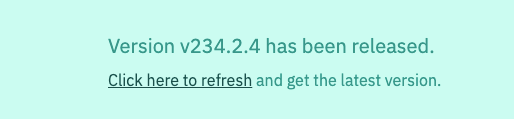
The banner pops in at the top of any page when a new release is out, with a link to reload.
Closing
The original version kept working, but these changes make it smoother. They came from watching how people actually used the software day to day over the past couple of years.
These are improvements that would likely never see the light of day in the era of hand-written code. But now we can point agents to fix and improve things. Nothing is too small or too low priority to be worth doing anymore.